

Free · No Daily Quota

Image to Table Converter

Convert images and screenshots into editable tables with AI OCR. Extract rows, columns, and merged cells. Copy Markdown or HTML, or download Excel and CSV.

Recognition Information

Drag & drop, paste an image, or click to select

PNG, JPG, WebP, HEIC/HEIF, BMP · Up to 10 MB

Preview

No sign-up · Ads support free OCR (hidden with credits) · Images sent to third-party AI. View plans · Privacy Policy

HOW IT WORKS

How to Extract Tables from Images

01

Upload a table image

Choose a PNG, JPG, WebP, HEIC, HEIF or BMP image up to 10 MB, or paste or drag a screenshot.

02

Choose Markdown or HTML

Leave Convert to HTML unchecked for Markdown, or check it for HTML with merged-cell support. Then start recognition.

03

Review, copy and download

Compare the detected rows and columns with your image. Copy Markdown or HTML, export individual tables as CSV, or download Excel (XLSX).

EXAMPLES

Real-world image-to-table examples

Compare a weekly staff schedule, an inventory list, and handwritten lab measurements with their extracted tables.

01

Weekly staff schedule with merged cells

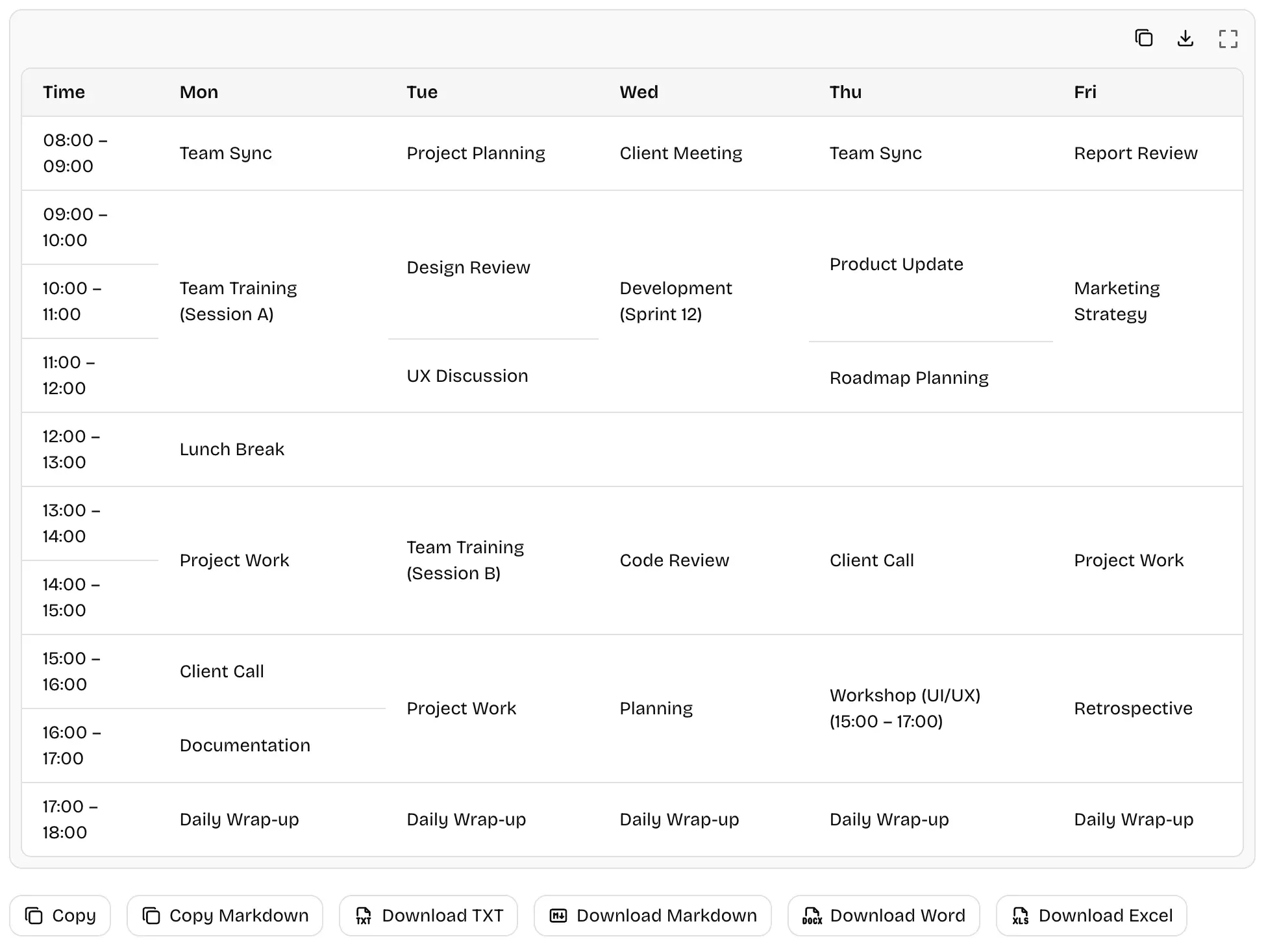
Extract a Monday–Friday schedule with activities spanning multiple time slots and a full-width lunch row.
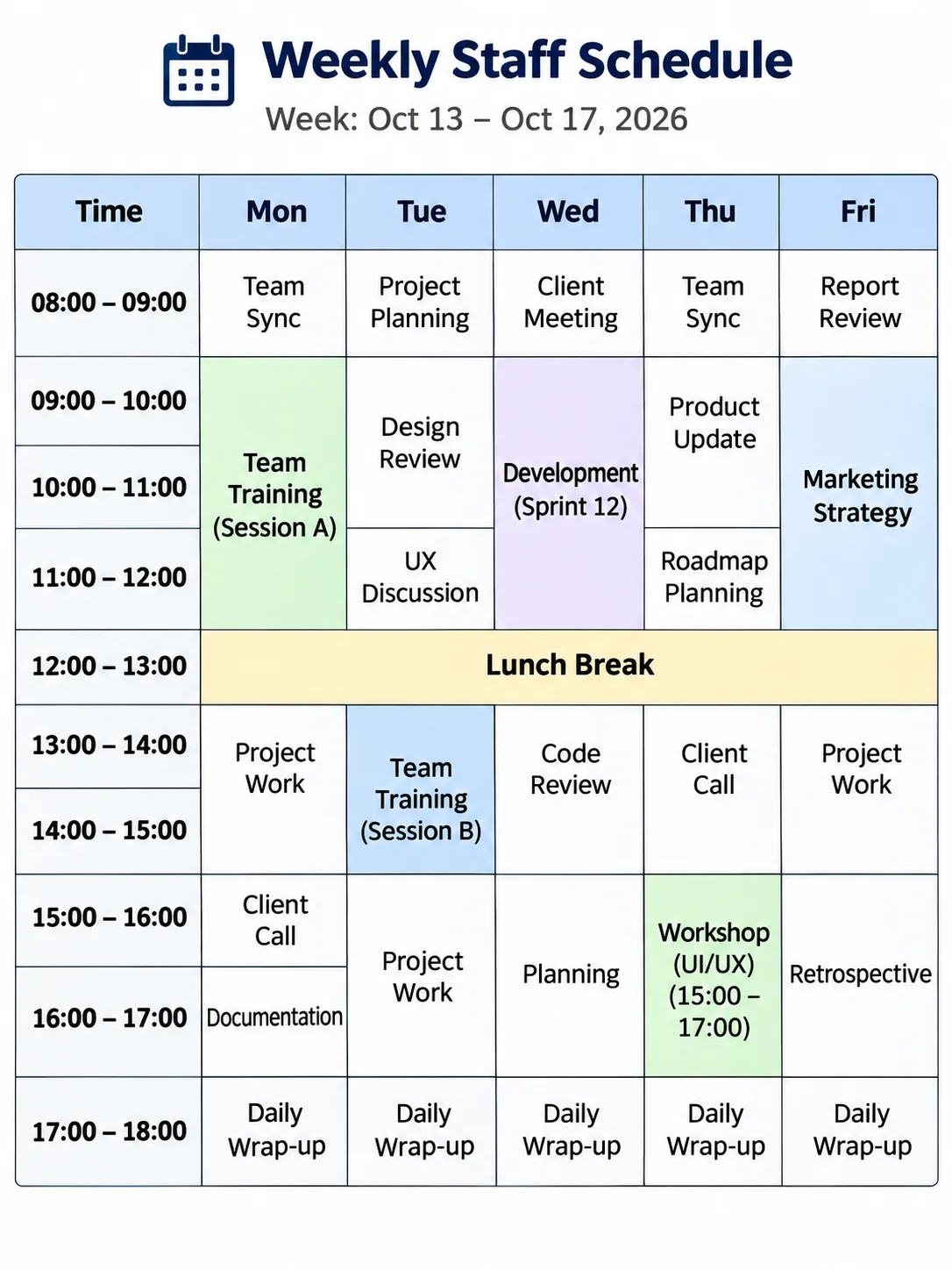
Original image
Weekly staff schedule with merged cells
Extracted tableSample table output; check extracted values before export.
Extracted weekly staff schedule showing multi-hour activities and a shared lunch row.

02

Inventory table with leading-zero SKUs

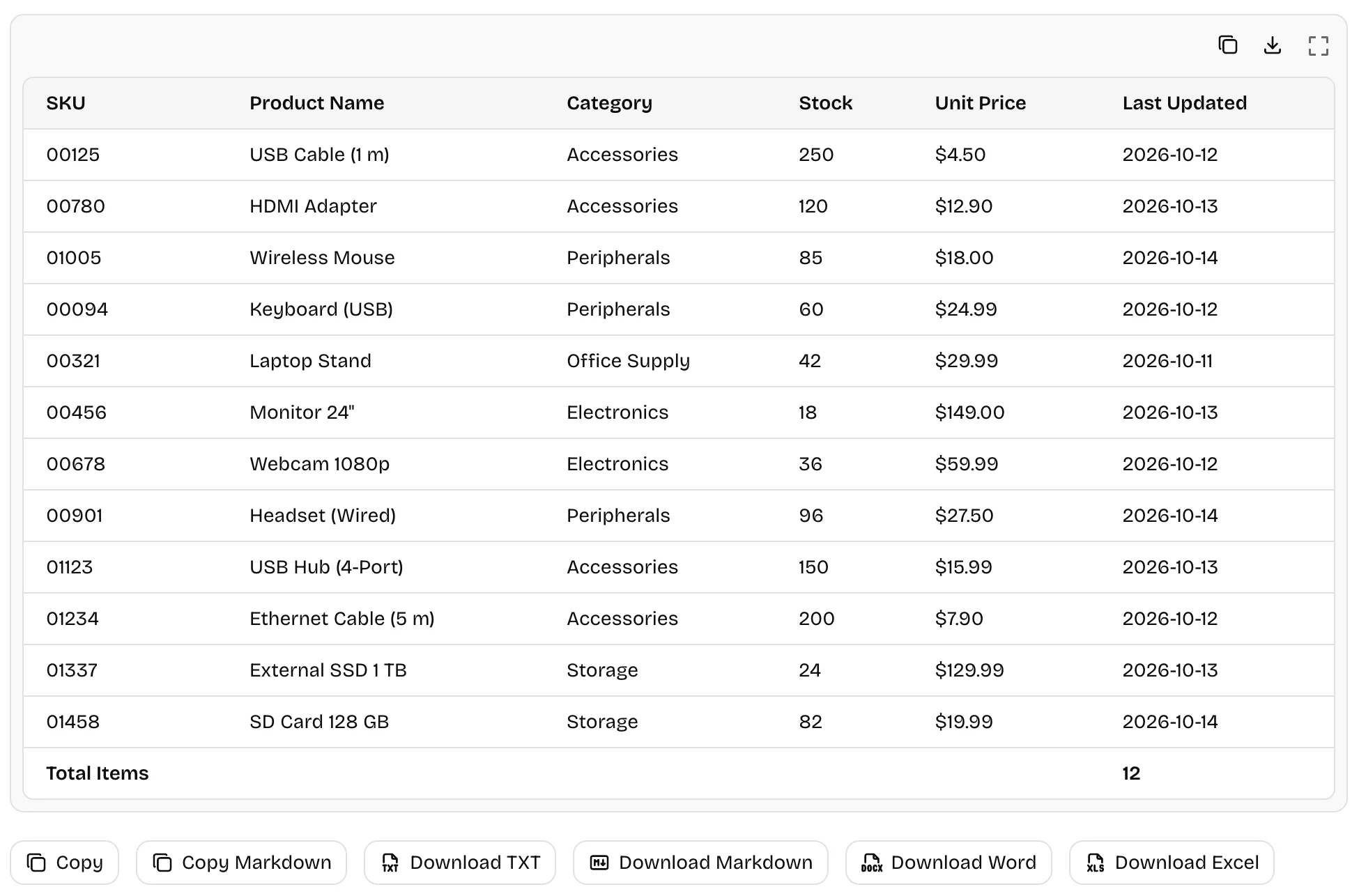
Convert 12 inventory records with leading-zero SKU codes, stock quantities, prices, dates, and a merged total row.
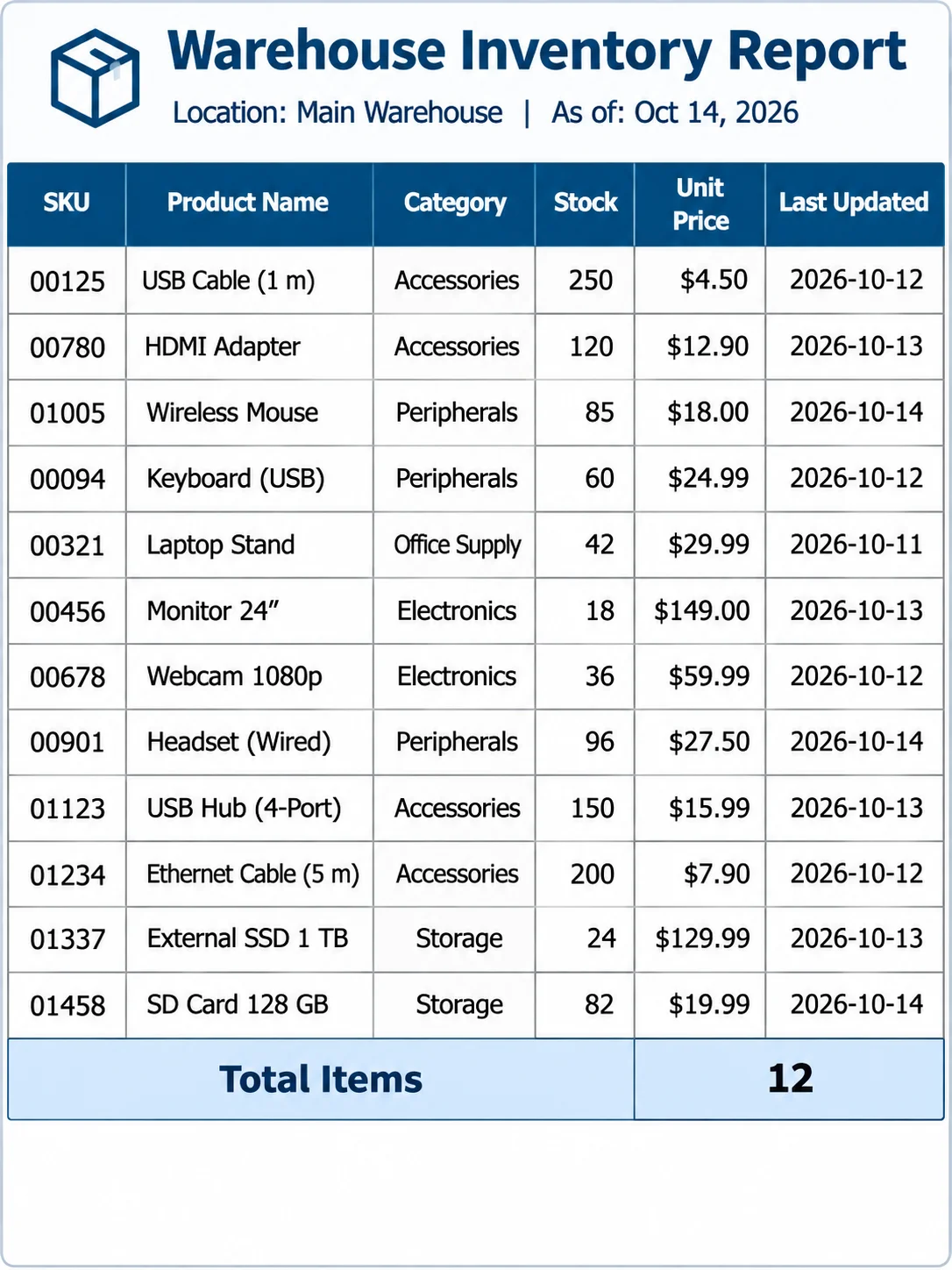
Original image
Inventory table with leading-zero SKUs
Extracted tableSample table output; check extracted values before export.
Extracted warehouse inventory table showing 12 products, leading-zero SKU codes, prices, dates, and total items.

03

Handwritten laboratory measurements

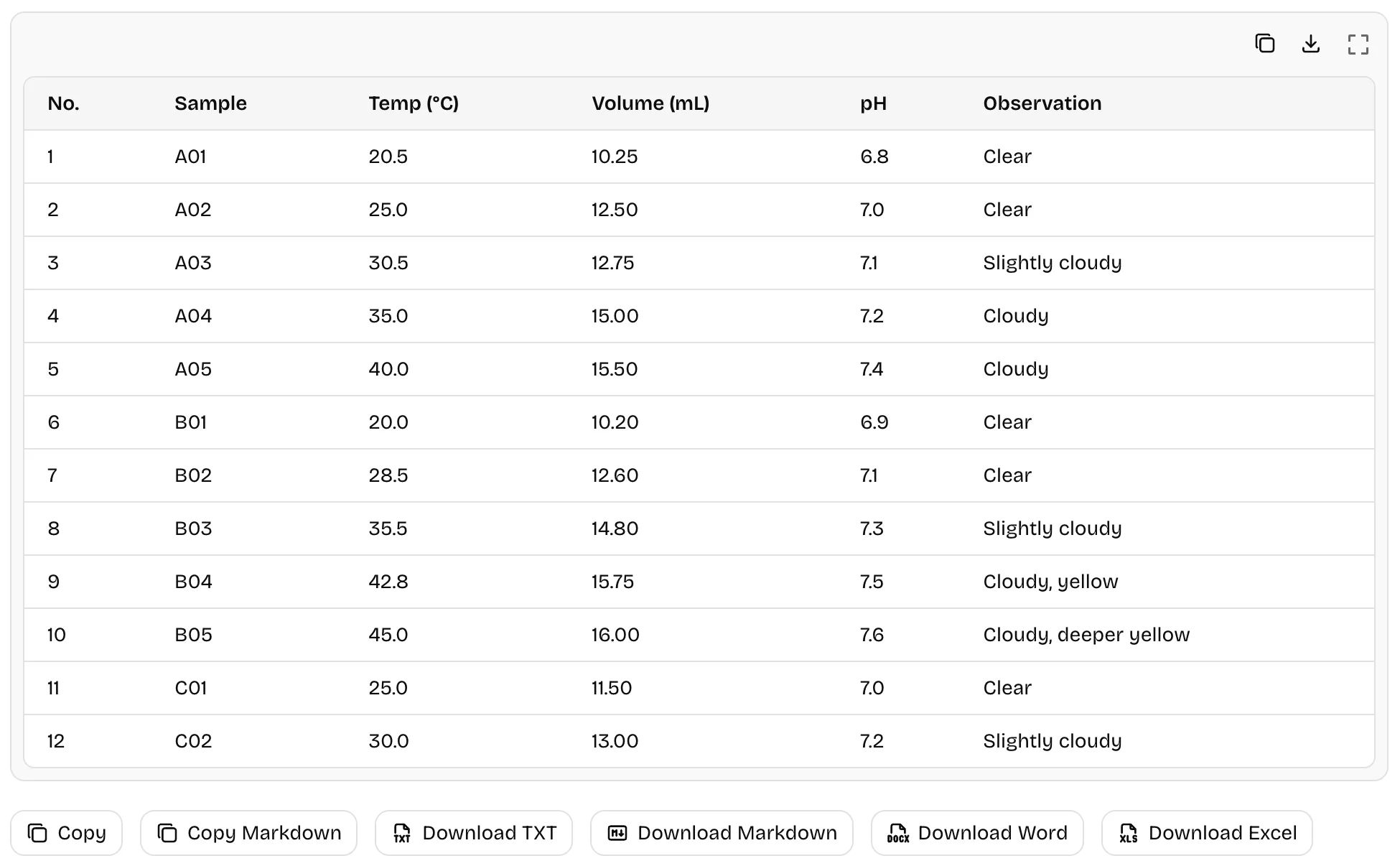
Recognize 12 handwritten sample records with temperatures, volumes, pH values, and observations in their table columns.
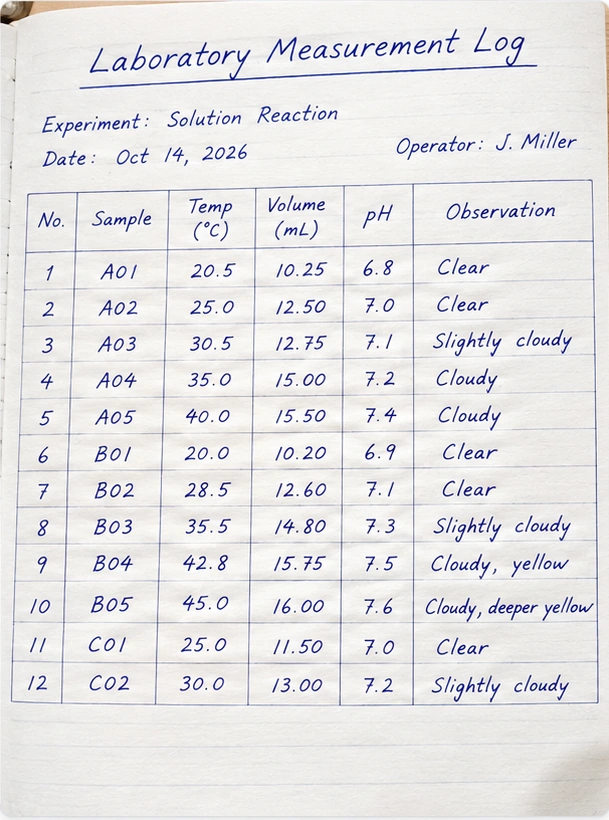
Original image
Handwritten laboratory measurements
Extracted tableSample table output; check extracted values before export.
Extracted table of handwritten lab measurements showing sample IDs, temperatures, volumes, pH values, and observations.

AI can misread cells, especially in faint, handwritten or borderless tables. Verify exported data before using it.

ABOUT

What Is Table OCR?

Table OCR recognizes text and reconstructs rows, columns, headers, and merged cells in an image. Unlike plain text OCR, it aims to preserve table structure. Review the result before using it.

  • Markdown

    For simple tables in documents and README files; merged cells are not supported.

  • HTML

    Supports merged cells using rowspan and colspan for web pages or copying.

  • Excel (XLSX)

    Exports an Excel workbook with separate sheets for multiple tables; cell values are stored as text.

  • CSV

    For simple table data exchange; merged-cell layout is not preserved.

FEATURES

Extract tables into editable formats

Image to Excel (XLSX)

Download one Excel workbook with a separate worksheet for each detected table. Cell values are stored as text; verify numbers before analysis.

Markdown or HTML table output

Use Markdown for simple grids or select HTML for semantic tables and merged cells. Copy the result or download its source.

Merged rows and columns

HTML tables can represent merged headers with rowspan and colspan. Review boundaries and cell contents after recognition.

Multiple tables and CSV exports

Preview each table from one image. Copy individual tables as Markdown, CSV or TSV; download CSV or a multi-sheet Excel file without another recognition.

Use Cases

Table OCR Use Cases

Turn photographed or scanned tables into data you can review and reuse.

Invoices & Receipts

Extract item names, quantities, and prices from invoice or receipt tables.

Financial Reports

Convert income and expense tables from report images into editable data.

Research Tables

Capture measurements and results from tables in research papers or lab reports.

Business Operations

Digitize inventory lists, price sheets, and staff schedules from images.

FAQs

Frequently Asked Questions

Share FreeAIOCR

If you find our AI OCR tools helpful, please share them with others

Share on social media or recommend our free OCR tools on your blog or tech forum

For Developers

Table OCR API

Integrate OCR into your application with our API.

API documentation